

LAPTOP COOLING PAD BUYING GUIDE
Laptop cooling pads are one of those accessories that everyone has an opinion on, and very few people understand. Do they actually work? Does more fans mean more cooling? And why does one pad cost $25 and another $250 when they both just blow air? We have written this guide to help make sense of it all before you spend your money.
WHY WOULD YOU NEED ONE?
The first thing to work out is WHY you think you need one. What is your laptop actually doing when it gets hot?
Every laptop has SOME cooling built in - a fan or two, and a heatsink, squeezed into a case that is thinner than most of us would like. The real question is whether that built-in cooling is enough for what you do, or whether it needs a hand. If your laptop is hot to the touch, noisy, or slowing down during gaming, video editing, or long Zoom calls with a dozen browser tabs open, that is your laptop telling you it's throttling - deliberately slowing itself down to keep its temperature under control.
BUT if your laptop only warms up a bit while you're in Chrome, Word or Netflix, you likely don't need to spend a cent on a cooling pad. That is normal, and the laptop's own cooling is handling it fine.
WHAT DOES IT ACTUALLY DO?
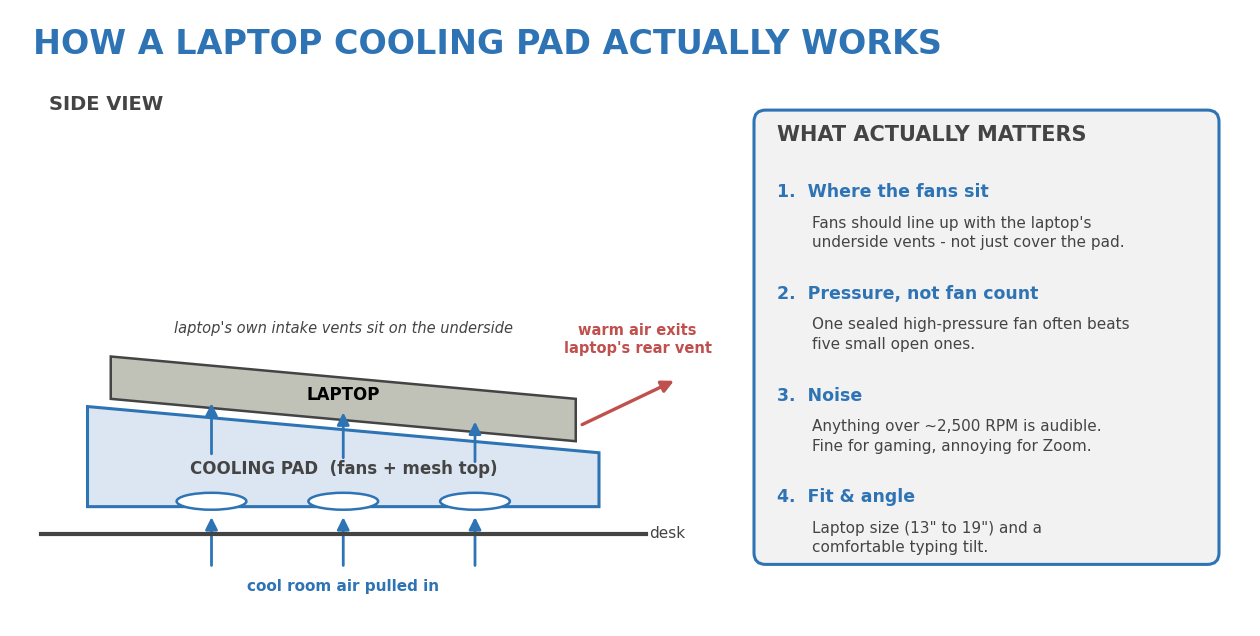
A cooling pad is a platform your laptop sits on, with one or more fans built in that push fresh, cool room air up into the underside of the laptop - which is where most laptops pull their air in from. Think of your laptop's own fan as one person trying to breathe through a straw while sitting flat on a bed. The cooling pad lifts it off the bed, and hands it a bigger straw. Speaking of beds, putting your laptop on a bed, with a nice soft bedspread that does a fabulous job at blocking the ports for the fans – thus no air can flow in or out. You can imagine how hot this gets your laptop.
What it doesn't do is replace the laptop's own cooling. If the laptop's internal fan is clogged with dust, or the thermal paste is years old, a cooling pad is a band-aid at best. It helps a healthy laptop run cooler; it does not fix a sick one.
MORE FANS DOES NOT MEAN MORE COOLING
This is the trap for consumers. Cheap pads advertise "5 fans!" or "6 fans!" but those are usually small, slow, and sitting in an open mesh tray, so most of the air simply leaks out the sides rather than going into the laptop. What actually matters is pressure and placement: can the pad push air through the laptop's vents, and are the fans actually lined up with those vents?
The better pads use a single large fan (roughly 140mm to 200mm) or a high-speed "turbo" fan sealed to the laptop with a foam or rubber gasket, so the air has nowhere to go but up into the laptop. One well-designed fan will beat five poorly placed ones every time.
DECODING THE SPECS
The listings throw a lot of numbers at you. Here's what they mean, and which ones to care about:
- RPM is how fast the fan spins. Current pads run anywhere from about 600 RPM up to 4,200 RPM. Faster moves more air - and makes more noise.
- CFM (cubic feet per minute) is how much air actually moves. A large 200mm fan can push around 64 CFM at a low, quiet speed. This is a more useful number than RPM, if the seller bothers to list it.
- Sealed chamber / gasket means the pad presses a foam seal against the laptop's underside so air is forced through the vents rather than escaping. This makes a bigger difference than any fan count.
- Removable dust filter - a pad pulling air in from the desk also pulls in every crumb and cat hair. A filter you can pop out and rinse is worth having, especially if the pad has a bottom-facing intake.
- Height settings - most pads tilt the laptop toward you for typing. Anything from two to seven positions; more is nice, but two is usually enough.
- USB hub - the pad takes one of your USB ports to power itself, so the better ones give you two or three back.
NOISE - THE TRADE-OFF NOBODY MENTIONS
The first trade-off question to ask yourself is "where is this laptop going to live, and who has to listen to it?"
The pads with the best cooling numbers - turbo fans running at 2,800 to 4,200 RPM - are loud. Perfectly acceptable with a gaming headset on. Genuinely annoying on a video call or in a shared office. Most decent pads have a speed control, so you can turn them down, but a pad turned down to be quiet is often no better than a cheaper pad running flat-out.
If you mainly want quiet, look at a single big 200mm fan on low speed. If you mainly want maximum cooling for gaming, accept that it will sound like a small hairdryer.
POWER, SIZE & FIT
Being able to actually use the thing on your desk is really easy to overlook until it's too late.
Consider...
- Does it fit your laptop? Pads are rated for a screen-size range - roughly 13" to 17" for most, and up to 19" for the big ones. Too small and the laptop overhangs the fans. Too big and it eats your desk.
- How is it powered? Most run off a single USB cable from the laptop itself - simple, and fine for travel. The high-power turbo pads need their own wall adapter (some draw over 30 watts), which is one more thing to plug in and pack.
- Where will you use it? A big, sealed pad with an external power brick is a desk fixture. If you move between the office, home and the café, a light USB-powered pad is the sensible choice, even if it cools a little less.
If you're unsure on any of these, it's worth asking before you buy rather than after.
WHAT ABOUT RGB LIGHTING?
Plenty of pads come with RGB lighting, LCD displays and touch controls. None of that cools anything. It's fine if you like the look, but don't pay extra for it on the assumption it means a better product - judge the fan and the seal, not the light show.
SO WHICH ONE?
Rather than a shopping list of model numbers (which are out of date within six months), here is how we'd match a pad to a person:
- Gaming laptop, mostly at a desk - a sealed turbo-fan pad with a foam gasket and its own power adapter. Loud, but it will make the biggest difference to temperatures and frame rates.
- Big 17"-19" workstation or gaming laptop - a wide metal-mesh pad with a single 200mm fan. Quieter, and one of the few styles that actually fits.
- Everyday laptop that runs warm - a light, USB-powered pad with two or three fans and a couple of tilt settings. Cheap, quiet enough, and easy to carry.
- Dusty house or pets - whatever you pick, get one with a removable filter.
And a word on price: the gap between a $25 pad and a $150 pad is usually the seal, the fan quality, the software control, and the build. Same as with laptops, the length of the warranty is one of the best indicators of expected quality.
BEFORE YOU BUY ONE AT ALL...
If your laptop has suddenly started running hot, or is a few years old and getting louder, the honest answer is that a cooling pad might not be the fix. A clean-out of the internal fan and fresh thermal paste will often drop temperatures far more than any pad can, and it deals with the cause rather than the symptom. A pad on top of a clean laptop is a great combination. A pad on top of a dusty one is a fan blowing on a blocked drain.
WE CAN HELP TOO
We can help you pick a cooling pad if you'd like a hand, but our greatest desire is that you end up with a laptop that actually runs cool - whether that's a pad, a clean-out, or both. So, feel free to email us any models you are seriously considering.
If you'd like us to service your laptop's cooling, give us a call - we'll tell you honestly whether a pad is worth it for your machine, or whether it just needs a good clean.
Here to help.